


Belk – Shopping App
3.87.23K Reviews
App Specs
- Version
- 67.0.3
- Updated On
- License
- Free
- Downloads
- 1,000,000+
- Developer
- Belk
- Categories
- Shopping
- Platform
- Android, iOS
Screenshots

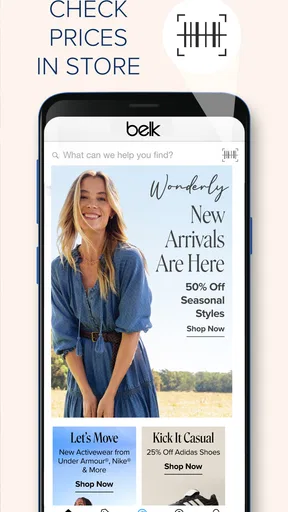
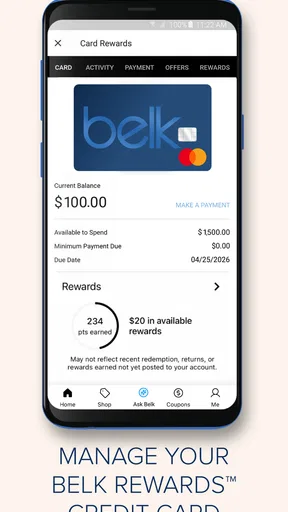
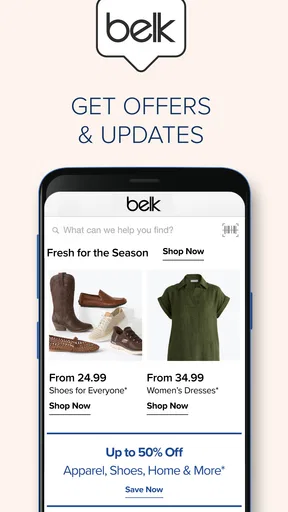
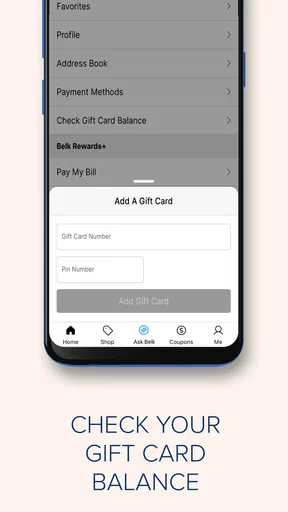
 Analysis by AppCompare
I tend to judge a shopping app by what happens when I’m trying to make a decision quickly, not just by how polished its first screen looks. Belk is a free shopping app from Belk, focused on fashion, shoes, home goods, designer handbags, beauty, and other finds. It suits people who already browse Belk’s range and want to do that on a phone, though the experience depends on having a steady connection for much of the shopping journey.
Shopping when your connection matters
I find it useful to think of a shopping session as a few separate decisions: locating an item, checking whether it suits my needs, and deciding when to buy. In the section ahead, I focus on how a dependable connection affects those moments, then consider practical ways to make browsing on a phone less hurried. A little planning can make the experience more deliberate, especially when your time or signal is limited.
Browsing, searching, and narrowing the field
Product discovery is where a mobile store can save time or create extra work. When I know roughly what I want, searching by a clear phrase is a more practical starting point than scrolling through broad categories. For example, someone shopping for a dress for an upcoming event can search first, then use available filters to narrow the results by details such as size, color, or price. That helps turn a large assortment into a manageable shortlist, though it still takes a little patience to compare similar options.
Search results and product pages are network-dependent parts of the experience: the app needs to load the information that helps you decide. A weak signal can make browsing feel less fluid, especially when you move quickly between listings or open several product pages. I’d avoid building a shopping session around a patchy connection if I need to compare items carefully. If I’m only browsing casually, a brief pause is less frustrating; if I’m trying to choose a specific size or gift, I’d wait until I have reliable service.
Making a shortlist before you buy
A useful way to shop is to treat the wishlist as a decision space rather than a place to collect everything that catches your eye. I’d save a few plausible options, then compare their descriptions and customer feedback before moving one to the cart. That can be especially helpful for clothes: reviews may offer clues about fit and quality that a product image cannot provide. It is not a guarantee that an item will suit you, but it gives you more context than choosing from pictures alone.
The same approach works for home purchases, where a product’s look is only part of the decision. Before buying, I’d check the details on each item and consider whether it fits the intended room and use. Keeping the shortlist small makes it easier to notice meaningful differences instead of losing track of why an item appealed to me. The trade-off is that saved products still need a fresh look before purchase; a wishlist is a reminder, not a substitute for checking current product information.
Deals need a little checking
Sales can make a shopping app feel rewarding, but I try not to let a promotion decide what I buy. When I spot an offer, I’d check the products included and compare the final choices against what I actually need. That matters with a deal involving multiple items: a discount is useful only if both pieces make sense for my wardrobe or household. Looking at the full product details before adding anything to the cart helps keep a tempting offer from turning into an unnecessary purchase.
Worth Reading Before You Choose

EA SPORTS FC Mobile 26 Is a Bigger Football Game, but It Takes Time

Flipboard Shows What News Apps Must Do Beyond the Feed

Switching to Android Auto Means Rethinking Your Driving Routine

Google Calendar Makes a Crowded Week Easier to Manage

Ludo King Makes the Most of the Minutes Between Plans

Baby Panda World Brings Quick Play to Modern Phones, but Its Game Library Feels Busy
Deal browsing also benefits from a good connection. Promotions and product information need to load clearly enough for you to understand what is being offered, and rushing through screens can make it easier to overlook conditions or choose the wrong item. I’d treat a sale as a reason to take a closer look, not as a reason to skip normal checks. For shoppers who prefer one fixed price and minimal browsing, a discount-led store experience may feel more distracting than helpful.
Cart, checkout, and the mobile moment
The cart is the point where I’d pause and review everything rather than checking out on autopilot. Confirm that each selected product, size, and quantity is what you intended, then look over the total shown before completing the purchase. On a phone, it is easy to tap quickly while multitasking, so that brief review is a worthwhile habit. The app is free to download, but that does not change the cost of the products you choose to buy.
For a realistic everyday use case, imagine getting a quiet moment during a commute or lunch break to find a gift. I’d search for a few suitable options, save the strongest candidates, and return when I can focus on details and checkout. I would not rely on the app to complete a time-sensitive purchase over unreliable public Wi-Fi. If the connection drops during browsing or checkout, I’d wait for service to return and verify the cart or order status before trying the same action again. That simple check can prevent duplicate effort and confusion.
Reviews and confidence before ordering
Customer reviews are most useful when I read them for specifics rather than treating an overall score as a promise. For clothing, I’d look for comments about fit and fabric; for home items, I’d pay attention to observations about use and quality. A few relevant reviews can help answer a practical question, while a general compliment may not tell me much. I still weigh those comments against the product information and my own needs, since another shopper’s experience may not match mine.
Belk is a better fit for someone who wants to browse the retailer’s own mix of fashion, shoes, home, handbags, and beauty in one place. Compared with a broad marketplace, its appeal is the Belk-focused selection rather than a search across many unrelated sellers. A general retailer app may be a better choice if your priority is comparing a much wider range of brands or shopping across many categories beyond Belk’s assortment. I’d use Belk when I have a clear reason to browse its range, not as my only destination for every kind of purchase.
Keeping the session manageable on mobile
Phone shopping works best when I separate discovery from commitment. If I have only a minute, I can search or save a candidate; when I have more time and a reliable connection, I can compare details and decide whether to buy. This split is useful for shoppers who get interrupted often, because it avoids making a purchase simply to finish before a signal or a spare moment disappears. It also makes the app easier to use for planned shopping than for hurried browsing with several distractions competing for attention.
Data-conscious shoppers can make their sessions more intentional by deciding what they need before opening the app, searching directly, and avoiding repeated trips through broad product pages. That is a general way to limit unnecessary browsing on mobile, not a claim about a special low-data mode. If you are concerned about using mobile data, use a connection you are comfortable with for image-heavy browsing and checkout. A steady connection is useful not only for speed but also for checking that the details you need have loaded before you make a decision.
Who will get the most from it
I’d recommend the app to shoppers who regularly consider Belk’s product range and like having a saved shortlist they can revisit. It can also suit someone who wants to check reviews while weighing a fashion or home purchase instead of relying on a quick impression. The app has an average rating of 3.9 from around 19,000 ratings, and it has been downloaded over a million times. Those figures suggest an established audience, but they cannot tell you whether the selection or shopping flow matches your own habits.
Belk’s app is probably not the right choice if you want a shopping tool that works well for extended browsing without dependable internet, or if you prefer a single-purpose experience with very little product discovery. It is also not my first pick when I need to compare a broad, cross-retailer selection in one search. For those situations, a wider marketplace or another retailer may be more convenient. The stronger reason to choose Belk is that you specifically want to shop its assortment, rather than expecting one app to cover every shopping need.
What to expect from the app itself
The app is rated for Everyone and first appeared on August 13, 2013. Its current version is 64.2.2, and it requires Android 10 or later on Android devices. Belk is the developer. Those basics make it easier to decide whether the app is suitable for your device, but the more important question is whether you want a dedicated mobile route into this retailer’s products.
My practical advice is to install it when you have a specific reason to browse Belk, then test your own shopping routine: search for an item you might genuinely buy, inspect its details, and see whether the saved-item and review workflow helps you decide. If the app makes that process convenient, keep it for planned purchases. If you find yourself repeatedly waiting on pages or prefer comparing across stores, using a different shopping option for those tasks is a sensible choice.
Hey there, shopaholics! If you're like me and love a good bargain while scrolling through your phone, you're probably always on the hunt for the next best shopping app. Well, let me tell you about my latest find: the Belk – Shopping App. This one's got some pretty cool features that might just make it your new go-to for fashion, home goods, and more. Let me break it down for you.
Discovering the Belk Experience
First things first, installing the Belk – Shopping App was a breeze. Available for both Android and iOS, it took just a few taps, and I was ready to dive into the world of Belk. What hit me right off the bat was the user-friendly interface. It's got this clean, sleek look that doesn’t overwhelm you with too much info at once. You know how some apps just bombard you with ads and pop-ups? Not here, folks. It’s a smooth ride from start to finish.
Browsing and Searching
Navigating through the Belk app is as smooth as butter. Whether you’re looking for the latest fashion trends or hunting down home essentials, the search function is right on point. I typed in "summer dresses" and boom, a plethora of options appeared with just a little scroll. There are filters galore to refine your search, like size, color, and price range, making it super easy to find exactly what you're looking for.
Deals and Discounts
Now let’s talk about deals because who doesn’t love a good discount, right? The app is constantly updated with the latest sales and special offers. I stumbled upon a "Buy One, Get One Free" deal on shoes and, honestly, my heart skipped a beat. It feels like Belk really gets us bargain hunters and is always throwing some juicy deals our way.
Wishlist and Cart
Another feature I loved is the wishlist. If you’re like me and enjoy a little window shopping, this feature is perfect. You can save items to your wishlist and come back to them later. And when it’s time to make a purchase, moving items from your wishlist to your cart is seamless. The checkout process is straightforward, and the app offers multiple payment options, including credit cards and PayPal. No fuss, no hassle.
Customer Reviews and Ratings
Before I hit that "buy now" button, I always check out the reviews. The app provides detailed customer reviews and ratings for each product. It’s super handy to read what other shoppers are saying about the fit and quality. It feels like getting advice from a friend, and it’s saved me from a few potential fashion disasters!
Order Tracking and Customer Service
Once you've made a purchase, keeping track of your order is a piece of cake. The app provides real-time tracking information, so you know exactly when your goodies will arrive. As for customer service, Belk has a pretty responsive team. They're available via chat and email, and my queries were answered promptly. It’s nice to know that support is just a click away if something goes south.
Final Thoughts
All in all, the Belk – Shopping App is a solid choice for anyone looking to enhance their mobile shopping experience. It combines ease of use with a wide range of products and fantastic deals. If you enjoy a good shopping spree from the comfort of your couch, this app might just be your new best friend. Happy shopping, folks!
Pros
- User-friendly interface enhances shopping experience.
- Wide range of categories for diverse shopping needs.
- Exclusive app-only discounts and promotions.
- Efficient order tracking and management features.
- Fast checkout process with multiple payment options.
Cons
- Occasional app crashes reported by users.
- Limited availability of customer support options.
- Some users experience delayed order updates.
- Inconsistencies in product availability.
- Push notifications can be overwhelming.
FAQs for Belk – Shopping App
What features does the Belk app offer for a better shopping experience?
The Belk app provides a seamless shopping experience with features like personalized recommendations, easy navigation, and exclusive app-only deals. Users can explore a wide range of products, from fashion to home goods, and take advantage of quick checkout options. Additionally, the app offers a barcode scanner to compare prices and find products easily.
Is the Belk app compatible with both Android and iOS devices?
Yes, the Belk app is available for both Android and iOS devices. It can be downloaded from the Google Play Store for Android users and the Apple App Store for iOS users. The app ensures optimal performance across various devices, providing a smooth and user-friendly shopping experience.
Are there any exclusive benefits for using the Belk app?
Belk app users have access to exclusive benefits such as app-only discounts and early access to sales. The app often features special promotions and personalized offers that aren’t available to in-store shoppers. Additionally, users can enroll in the Belk Rewards program directly through the app to earn points on purchases.
How does the Belk app handle customer service and support?
The Belk app offers robust customer service options, including in-app chat support and a comprehensive help section. Users can track orders, initiate returns, and contact customer service directly through the app. The support team is available to assist with any issues or queries, ensuring a satisfying shopping experience.
Can I manage my Belk Rewards through the app?
Yes, the Belk app allows users to manage their Belk Rewards account seamlessly. You can view your current points balance, track your rewards, and get notifications about exclusive offers and bonus events. The app makes it easy to stay updated on your rewards status and maximize your benefits.


